![Logo_Trinnov_Black_CMJN.png]](https://kb.trinnov.com/hs-fs/hubfs/ISE%202024/Logo_Trinnov_Black_CMJN.png?height=50&name=Logo_Trinnov_Black_CMJN.png)
Summary
- Introduction
- Assembly steps
- Positioning at the Reference Seating Position (RSP)
- Taking multiple measurements
- Next steps
Introduction
This step is part of the Calibration Wizard workflow.
After connecting your microphone and loading the compensation file (for V9 models), you're ready to position the microphone for accurate room measurements.
Assembling the Microphone Setup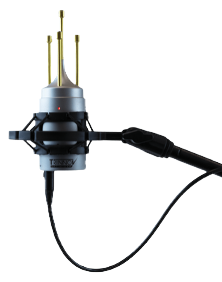
1. Attach the hardware
- Mount the shock mount securely onto the stand or boom arm.
- Insert the microphone carefully, its tight fit minimizes vibration.
2. Power check
- V9 Microphone (Altitude16/32): mute your processor or disconnect the microphone cable. Then power on the microphone to make sure the red LED lits and confirms power.
- V10 Microphone (AltitudeCI, NOVA) : Connect the Ethernet cable and move to the Calibration level step fo the wizard to confirm microphone power.
Note: If measurements appear inconsistent on V9 model, replace the battery.
3. Connection
Do not plug the microphone into the processor until the unit is muted. (See Connect the Microphone article.)
Positioning at the Reference Seating Position (RSP)
The RSP is the primary listening position and the anchor for accurate speaker localization.
How to position the microphone
- Place the microphone upright at ear height in the RSP.
- If the chair has a high backrest, raise the microphone by ~15cm / 6in to avoid obstruction.
- The Red LED must face forward toward the center speaker (or phantom center).
- Adjust the stand until the microphone is completely stable, level and plumb
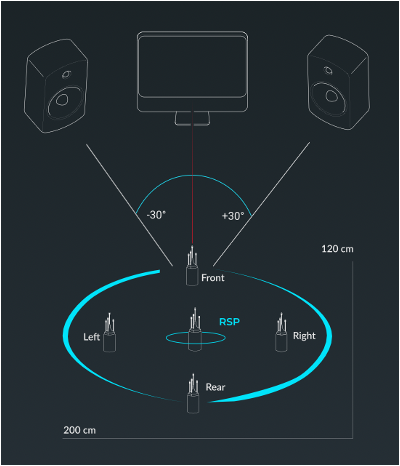
Note: To know where your your Reference Seating Position (RSP), read the article Reference Seating Position (RSP) to understand how to identify the optimal measurement location.
Tip : The larger the room or the longer the listening distance, the more even small angular deviations can affect speaker localization - double-check alignment
Taking Multiple Measurements
After the first measurement at the RSP, the Optimizer already has the precise loudspeaker locations.
In the following steps of the calibration wizard, you can decide to perform additional measurements, which help widen and smooth the listening area.
Guidelines for secondary measurements
- Keep the microphone upright and level; exact azimuth is no longer critical.
- Maintain similar height to the RSP measurement.
Tip : Multiple measurements improve seat-to-seat consistency. For more details, refer to Single or multiple measurements.
Next steps
The next step in the Calibration Wizard is to set the appropriate level for calibration.
Before the Optimizer can measure your room accurately, all speakers must be within a few dB of each other. This quick process uses pink noise to ensure consistent levels across your system.
Read the article Set the Calibration Level to learn how to balance speaker levels and prepare for Optimizer calibration.
Once levels are balanced, you'll be ready to run the full Optimizer calibration.