![Logo_Trinnov_Black_CMJN.png]](https://kb.trinnov.com/hs-fs/hubfs/ISE%202024/Logo_Trinnov_Black_CMJN.png?height=50&name=Logo_Trinnov_Black_CMJN.png)
Summary
- Introduction
- Connecting V9 and earlier Microphones
- XLR3 Connection (Altitude32, Amethyst)
- XLR5 Connection (Atitude16, Altitude32)
- Next steps after connecting my V9 microphone
- Connecting the V10 Microphone (Nova, AltitudeCI)
Introduction
Before connecting your microphone, please refer to the dedicated 3D Measurement Microphone article to understand which microphone you have in your possession.
Connecting Analog Microphones (V9 and Earlier)
Before connecting any V9 or earlier analog microphone, you must mute the system.
Failing to do so may create a feedback loop that can damage speakers and, in extreme cases, cause hearing damage.
The V10 microphone includes built-in safeguards and will automatically mute the system when connected.
1. XLR3 Connection
For models requiring XLR3: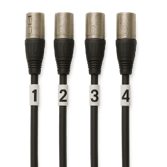
The microphone cable has a micro-XLR5 connector on one end for the microphone and four separate XLRs to connect to the unit.
- Each XLR3 connector is labeled 1–4 (shown on the right)
- Connect these four plugs to the microphone inputs on the back of the processor in order from left to right.
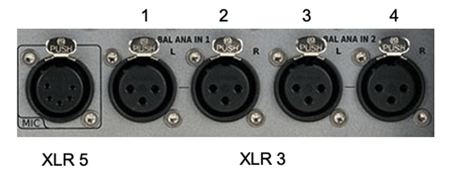
An XLR5 adapter (shown below) can be used to connect to units without an XLR5 port:
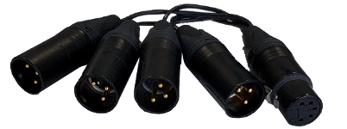
XLR adapter
Before connecting the micro-XLR5 plug to the microphone:
- Ensure microphone power is off (red LED not illuminated).
- Confirm the system is muted.
- Plug in the connector and proceed with the calibration process.
2. XLR5 Connection
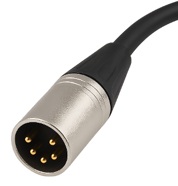
For models using XLR5:
- Ensure the microphone power is off and the system is muted.
- Connect the XLR5 plug to the processor input.
- Connect the micro-XLR5 plug to the microphone base.
Next step after connecting my V9 microphone
Once your microphone is connected, but before calibrating the system, you must first load the compensation file.
Learn how to:
Connecting the V10 Microphone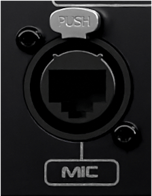
The V10 microphone uses a shielded Cat6A cable with an Ethercon (RJ45) connector (shown below right), featuring a locking mechanism similar to XLR.
- Phantom power: The microphone no longer requires a 9-volt battery.
- Built-in Compensation File: Stored internally, eliminating the need for an external file.
- Auto-Mute Function: When the V10 is connected, the system automatically mutes to prevent feedback.
Once connected, follow the instructions in the Place the Microphone article. Please also refer to Reference Seating Position and Microphone Compensation File.