![Logo_Trinnov_Black_CMJN.png]](https://kb.trinnov.com/hs-fs/hubfs/ISE%202024/Logo_Trinnov_Black_CMJN.png?height=50&name=Logo_Trinnov_Black_CMJN.png)
Summary
- Volume vs. Level: terminology
- Accessing the volume settings page
- Level display unit
- Level settings
- Level display offset
Volume vs. Level: Terminology
- Volume refers to the perceived loudness of audio from the listener’s perspective. It is subjective and depends on the listener’s environment, hearing, and preferences.
- Level is a technical measurement of audio signal strength, expressed in units such as dB (dBFS), dBC, or Cinema Units. It provides an objective, quantifiable way to set and control audio output.
Accessing the Volume Settings Page
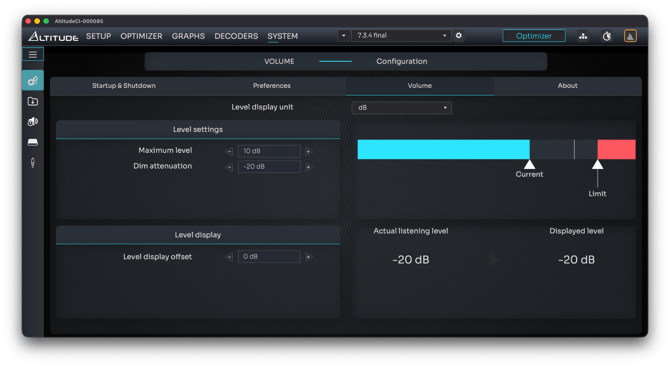
- Click System on the top navigation bar.
- Select the General icon (three gears).
- Click the Volume tab.
Level Display Unit
The Level Display Unit dropdown allows you to choose how volume levels are displayed on-screen.

Options include:
Level Display Units
|
Unit |
Description |
|
dB |
Displays levels relative to unity gain (0 dB = input signal is not reduced, though the total output accounts for acoustic filters). |
|
dBC |
Displays actual acoustic pressure level using C-weighting, reflecting how louder sounds are perceived. Standard cinema reference: 85 dBC. |
|
Cinema |
Commercial cinema scale from 0–10, where 7 = 85 dBC (reference) and 0 = 0 dBFS. Useful for installations aligned with cinema standards. |
Level Settings
Reference Recall Volume (NOVA only)
NOVA includes a setting called Reference Recall Volume, which allows users, such as mixers, to recall their reference listening level at any time.
This is particularly critical in post-production environments where standardized mixing levels are essential to avoid mixes that are too loud or too quiet.
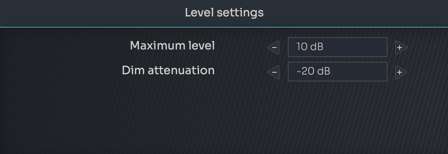
Maximum Level
- Sets the highest volume the system can output.
- Default: +10 dB.
- Useful for preventing excessive volume levels.
Dim Attenuation
- Temporarily lowers the volume without muting.
- Default attenuation: -20 dB (adjustable).
Warning: If the Dim function is left active and forgotten, manually raising the volume by 20 dB or more before unmuting the system can result in unexpectedly high volume levels, potentially damaging equipment or hearing.
Current/Reference/Limit Graphic
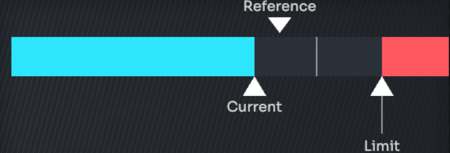
- Current Listening Level: shown as a teal sliding bar.
- Reference Level (NOVA only): Indicated by a vertical line and the word "Reference." Adjusting the reference recall volume moves the text and arrow..
- Limit Level: marked with a red indicator and bar. The processor cannot enter in the red zone.
Level Display Offset
- Customizes how “full volume” appears to the end user.
- Useful for adjusting the onscreen number if needed.
Tip: use the the level display offset to match preset levels, or match the reading of an external sound meter if differences exist
Actual Listening Level vs. Displayed Level

- Provides a numeric comparison between:
- Actual Listening Level (using the selected display unit).
- Displayed Level (after applying any level display offset).
- Ensures the displayed number aligns with the installer’s intentions and is intuitive for the end user.