![Logo_Trinnov_Black_CMJN.png]](https://kb.trinnov.com/hs-fs/hubfs/ISE%202024/Logo_Trinnov_Black_CMJN.png?height=50&name=Logo_Trinnov_Black_CMJN.png)
Summary
Overview
The Startup & Shutdown page defines how the processor behaves when you power it on or off.
Both AltitudeCI and NOVA include startup preset control, while each product offers additional options specific to its design.
- AltitudeCI → Reboot/shutdown commands + power mode (Power off / Network Standby) + startup preset
- NOVA → Startup preset + startup volume rules (Auto mute, Last used volume, Recall volume)
Accessing the Startup & Shutdown Page
- Open the Trinnov App or connect through the Web UI.
- Select System in the top navigation bar.
- Open the Startup & Shutdown tab (AltitudeCI) or the Startup tab on NOVA.
AltitudeCI Options
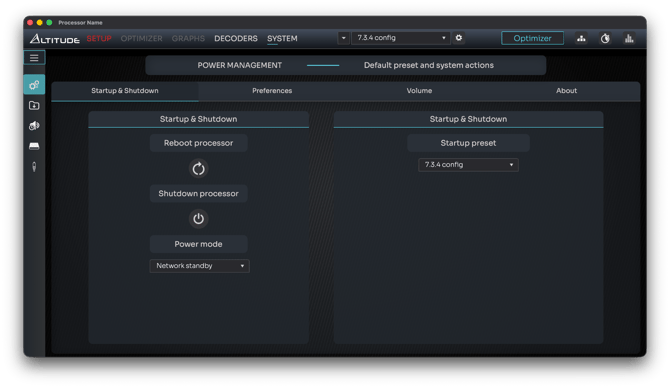
Reboot and Shutdown (AltitudeCI)
AltitudeCI provides direct control of power actions:
- Reboot processor - Immediately restarts the unit
- Shutdown processor - Turns the unit off using the selected power mode (power off or network standby).
Warning: these commands do not ask for confirmation. Use them only when the system is not in use.
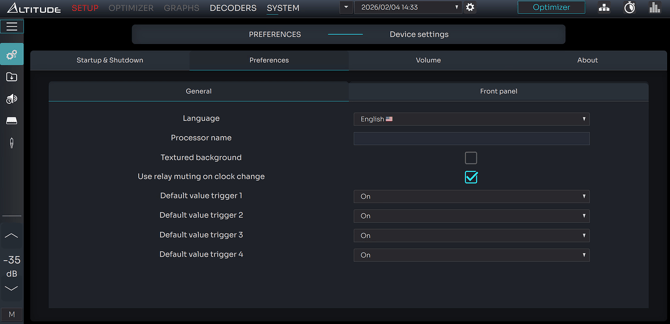
Warning: In some cases, you might end up with pops during power on & off. In this case, you can mute the DAC in the Systems settings (System>Preferences>General). Enable to mute the relay DAC. Untick to keep as is.
Power Mode (AltitudeCI)
AltitudeCI offers two power states when shutting down:
Power off (default)
- Full power cycle
- Lowest power consumption
- Standard boot time
Network Standby
- Keeps the unit in an idle low-power state
- Faster boot when powered on
- Slightly higher energy usage
Tip: choose Network Standby if the processor is turned on and off frequently during the day or if you can’t wait for a full startup sequence while your entire system is turned on.
Auto Power Boot Mode (NOVA and AltitudeCI)
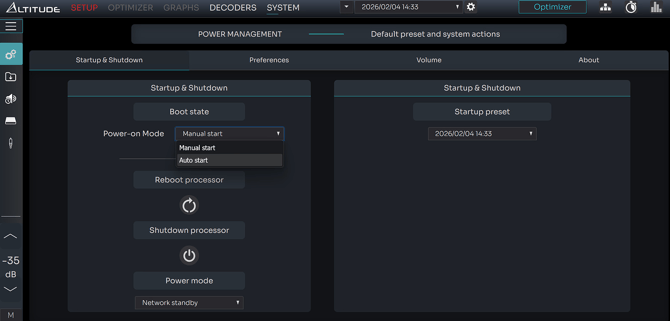
There is an option available to automatically boot on power-on. For instance, It can be useful to automatically resume operations after a power outage.
In this case, you can go to System > Startup & Shutdown. In the Power-on Mode section, select Auto start so that the device starts up automatically after a power outage.
Select Manual to leave it off.
By default, it is set to Manual
Startup Preset (AltitudeCI)
Choose which preset the processor loads automatically at startup.
Only one preset can be assigned as the default.
Important: AltitudeCI always restores the last used listening level. There is no option to set a fixed startup volume or enable auto mute.
NOVA Options
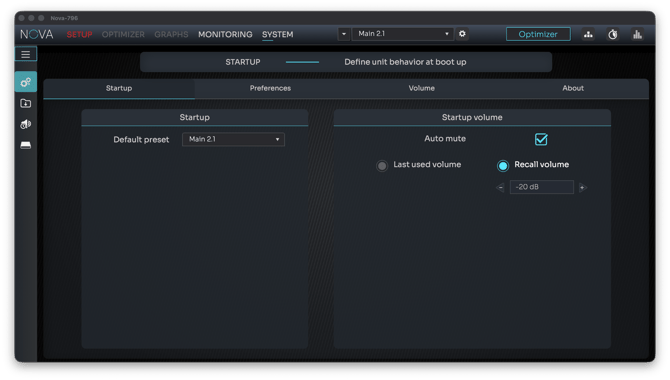
Default Preset (NOVA)
Select which preset loads when NOVA powers on.
This setting appears on the left side of the page.
Startup Volume (NOVA)
NOVA includes a dedicated Startup volume section, letting you define how the unit handles output level at boot-up.
Options include:
-
Auto mute: when enabled, NOVA starts muted, the safest behavior when using external amps or sensitive speakers.
-
Last used volume: restores the exact level that was active when the processor was last used.
-
Recall volume: loads a specific chosen volume every time NOVA starts.