![Logo_Trinnov_Black_CMJN.png]](https://kb.trinnov.com/hs-fs/hubfs/ISE%202024/Logo_Trinnov_Black_CMJN.png?height=50&name=Logo_Trinnov_Black_CMJN.png)
The Reference Seating Position (RSP) is the primary listening position in your space and serves as the anchor point for Trinnov calibration. This position provides the Optimizer with critical timing information needed for accurate speaker localization and acoustic correction.
Summary
What is the Reference Seating Position
The Reference Seating Position (RSP) is:
- The main listening position in your space
- The first measurement location for Trinnov calibration
- The anchor point for speaker localization, timing, level and remapping calculations
For home theater and cinema, the RSP typically aligns with the center seat, positioned at the midpoint between left and right speakers. For pro audio, it's the mix position where the engineer sits.
Note: The term "Reference Seating Position" is defined in ANSI/CTA-CEDIA RP22 Immersive Audio Design Practice as the standard terminology that meets both audio and video requirements.
RSP by application
Home theater and commercial cinema
According to CEDIA, the RSP "is both the main listening position and the main viewing position."
Typical positioning
- Centered horizontally - Aligned with the midpoint between left and right speakers or perpendicular to the center speaker
- 2/3 back from the screen - Based on typical cinema viewing habits where most viewers naturally choose this position
- Owner's preferred seat - Ultimately where the system owner will spend most listening time
Reference level considerations
For systems claiming "reference level" performance, specific SPL requirements apply at the RSP:
- Main speakers: Minimum 105 dB peak SPL
- Subwoofers: Minimum 115 dB peak SPL
Note: these are very loud levels. Most listening occurs well below reference level, but these benchmarks ensure adequate headroom and dynamic range for demanding content.
Tip: the RSP location influences speaker selection and amplification requirements. Farther seating distances require more powerful speakers or amplification to achieve target levels.
Warning: do not confuse the minimum reference levels with the calibration level, they serve different purposes. See Set Calibration Level for details.
For detailed technical specifications, see ANSI/CTA-CEDIA RP22 Immersive Audio Design Practice.
Pro audio and studios
In professional audio environments, the RSP is:
- The mix position - Where the sound engineer or editor works
- The engineer's seat - Positioned at the mixing console or workstation
- Optimized for critical listening - Typically with stereo speakers placed 60° apart
Note: While no formal ANSI standard defines RSP for pro audio, the mix position serves the same function as the RSP in home theater, it's the critical reference point for acoustic calibration.
Why RSP matters for Trinnov calibration
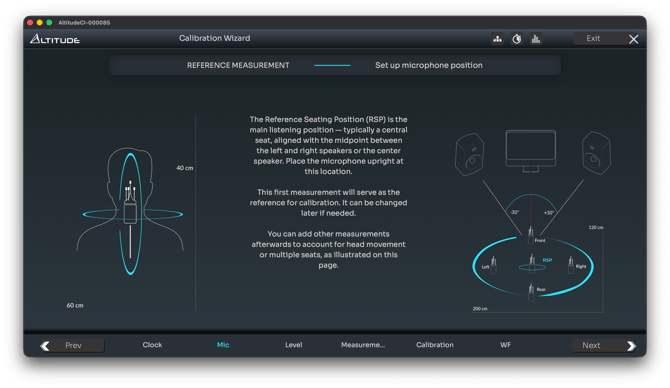
The Optimizer uses the RSP measurement for precise speaker localization:
Critical timing reference
- Calculates exact speaker positions - The Optimizer determines the 3D coordinates of each speaker relative to the RSP
- One reference per preset - Only one measurement can serve as the timing and level alignment reference
- Foundation for additional measurements - All other measurements are relative to the RSP data
In the calibration interface
The RSP appears as:
- "Reference measurement" or "REF" or "Time alignment Ref" in the calibration settings (terminology varies by software version)
- The first measurement in your measurement list
- The anchor point in the speaker position visualizations
Important: Even when taking multiple measurements, one position must always be designated as the reference. The Optimizer uses this single point to establish precise speaker locations and delay alignment, then applies acoustic correction across all measurement positions.
Verification
After RSP calibration:
- Review speaker positions - Check the top view and elevation displays
- Verify symmetry - Left and right speakers should be closely matched
- Confirm distances - Compare measured distances to your physical setup
If results don't match your expectations, see Troubleshooting Calibration.