![Logo_Trinnov_Black_CMJN.png]](https://kb.trinnov.com/hs-fs/hubfs/ISE%202024/Logo_Trinnov_Black_CMJN.png?height=50&name=Logo_Trinnov_Black_CMJN.png)
Summary
Overview
The Trinnov Altitude is built upon a unique, scalable, software-oriented hardware platform designed to deliver modern 3D audio processing without relying on traditional, rigid digital signal processor (DSP) chips.
Because it leverages a high-performance processor and an optimized operating system architecture , it initializes and manages system power much like a specialized computer rather than a standard consumer electronics device.
Understanding how to correctly manage this platform's power states ensures system stability, protects data integrity during updates , and maintains the long-term reliability of your high-end theater configuration.
Power Sequence Best Practices
When powering any high-performance theater system on or off, adhering to a precise sequencing order is essential to protect your connected components and speakers from electrical thumps or voltage transient spikes.
Rule of Thumb: Power your signal sources and processing hardware on first, and your power amplification channels on last. When turning the system off, reverse this exact sequence.
Note: To avoid damaging your drivers or amplifiers, always ensure your power amplifiers are turned on last during boot-up and turned off first during shutdown.
Step-by-Step Power-On Procedure
To properly initiate the boot sequence of your Trinnov processor, follow these steps:
Altitude
-
Locate the master Power Switch on the rear panel of the unit.
-
Toggle the rear master Power Switch to the ON position to supply main AC power to the internal hardware platform.
-
Move to the front of the device and press the front panel Power Switch button once to start the operating system boot process.
-
Wait approximately 60 seconds for the system initialization to complete. During this startup sequence, the front panel display will show the Processor logo splash screen.
-
Once the main operational display layout appears on the front panel screen showing your volume level and current input, turn on your system power amplifiers.
Amplitude
-
Locate the 2 master Power Switches on the rear panel of the unit.
-
Toggle the 2 rear master Power Switches to the ON position to supply main AC power to the internal hardware platform.
-
Move to the front of the device and press the front panel Power Switch button once to start the operating system boot process.
- The front log will turn green once the device is ready to be used.
Nova
-
Locate the master Power Switch on the rear panel of the unit.
-
Toggle the rear master Power Switch to the ON position to supply main AC power to the internal hardware platform.
-
Move to the front of the device and press the front panel Power Switch button once to start the operating system boot process.
-
Wait approximately 30 seconds for the system initialization to complete. The main logo in the center of the processor will light up once it is ready to be used.
Note: The Altitude and Nova are designed with a next-generation software architecture and do not start instantaneously.
Step-by-Step Power-Off Procedure
To shut down the device safely, use the following chronological sequence:
- Turn off all connected power amplifiers first to prevent any shutdown transients from reaching your loudspeakers.
- Press the front panel Power Switch button once.
- The front panel display will change to show a SHUTTING DOWN please wait... message screen.
- Leave the processor alone until the screen goes completely dark, indicating that the software has completed a safe, structured shutdown routine.
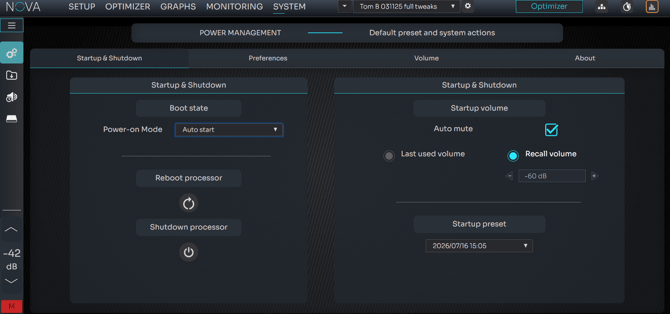
Note: You can configure the hardware to automatically initialize the boot sequence immediately when the rear master power switch receives AC mains power or when an external smart power conditioner restores current to the rack (System>Startup & Shutdown>Power-on Mode
(Only available on AltitudeCI & Nova)