![Logo_Trinnov_Black_CMJN.png]](https://kb.trinnov.com/hs-fs/hubfs/ISE%202024/Logo_Trinnov_Black_CMJN.png?height=50&name=Logo_Trinnov_Black_CMJN.png)
Summary:
Introduction
The NOVA Immersive feature extends NOVA’s optimization capabilities to immersive audio monitoring (up to 7.1.4 environments) by supporting Dante audio network inputs.
To enable this feature, the NOVA system must be upgraded with an additional OPT2-NOVA license on a NOVA unit configured with 6 channels of optimization.
The immersive workflow integrates directly into the existing NOVA Setup Wizard and follows the same calibration workflow as standard stereo monitoring configurations.
Startup
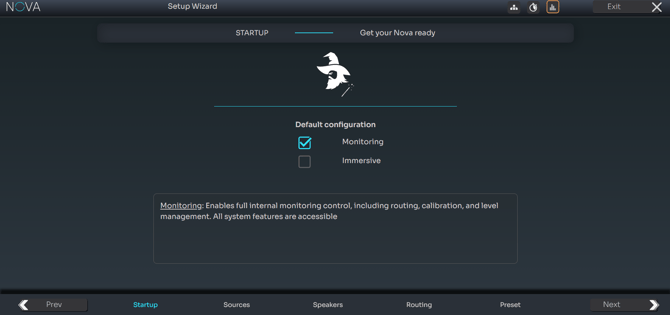
The Startup page initializes the immersive workflow. Two operating modes are available: Monitoring and Immersive. Immersive mode enables up to 12 optimized channels using Dante routing.
Monitoring → Ticked → NOVA becomes the monitor controller. Unticked → an upstream monitor controller will handle source/speaker switching and volume controlImmersive → Ticked → Enables up to 12 channels via Dante for Immersive configurations. Limited to 48khz and not compatible with Waveforming. Unticked → NOVA is limited at 6 Optimizer channels and can benefit from Analog/ AES/ Dante connections along with 96khz of sampling rate playback.
The Waveforming feature is not accessible when ticking the Immersive box.
Sources
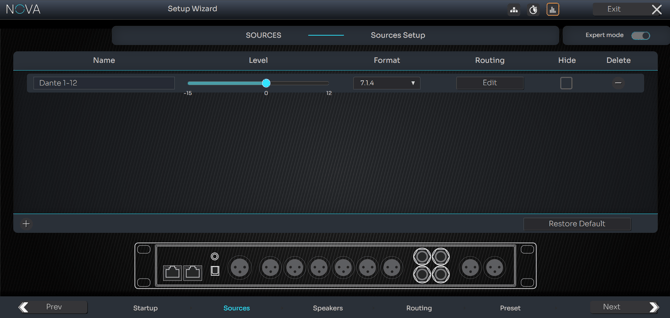
Immersive mode currently supports a single source type: Dante Input. Available immersive formats include 5.1.2, 5.1.4, 5.1.6, 7.1.2, 7.1.4, 9.1.2, 11.1 Auro and 12.0.
Speaker Set
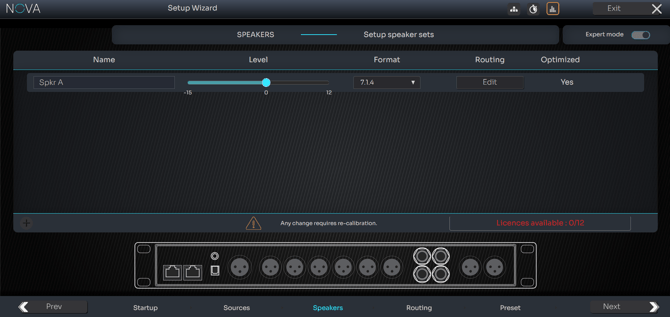
The Speakers page defines the immersive speaker configuration associated with the preset. Once selected, NOVA automatically generates the corresponding immersive speaker structure.
Expert Routing
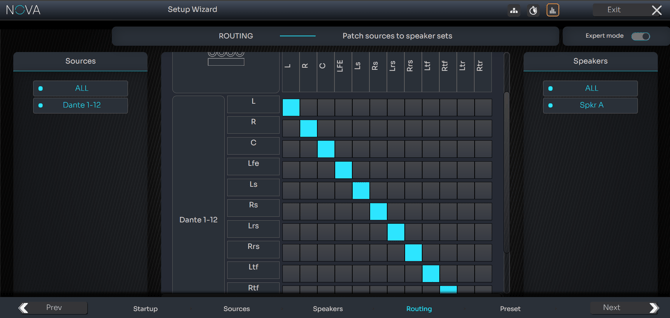
When Expert Mode is enabled, output routing becomes editable. Each speaker channel can be assigned independently to Analog, AES/EBU or Dante outputs.
Limitations
Immersive mode supports Dante input only, operates at 48 kHz only, and supports up to 12 optimized channels. The Waveforming feature is not accessible in this mode either.