![Logo_Trinnov_Black_CMJN.png]](https://kb.trinnov.com/hs-fs/hubfs/ISE%202024/Logo_Trinnov_Black_CMJN.png?height=50&name=Logo_Trinnov_Black_CMJN.png)
Summary
Altitude16
Front Panel
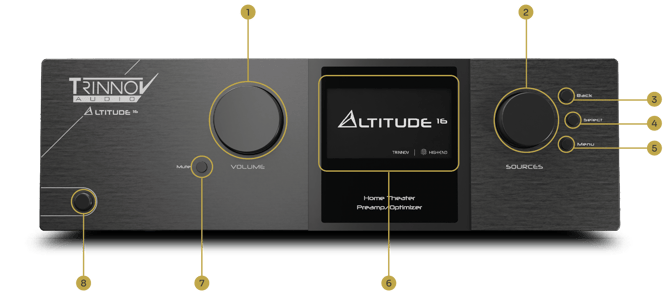
- Volume knob
- Selection knob
- Back button
- Select button
- Menu button
- Front-panel display
- Mute button
- Power button
Rear Panel
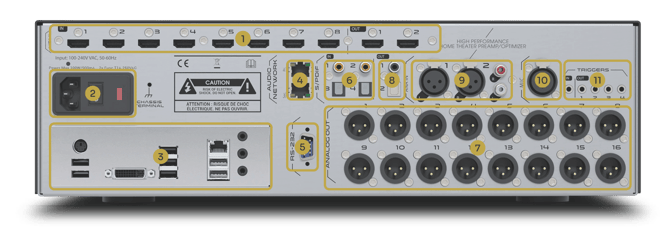
- HDMI 2.1 - 8 INPUTS, 2 OUTPUTS
- POWER
- AC Input
- Fuse
- Master Power Switch
- PC CONNECTORS
- AUDIO NETWORK PORTS (Unused)
- RS232 SERIAL CONTROL PORT
- DIGITAL INPUTS
- 2x Stereo S/PDIF on RCA
- 2x Stereo S/PDIF on TosLink
- ANALOG OUTPUTS
- 1-16 XLR Connectors
- DIGITAL OUTPUTS
- 1x Stereo S/PDIF on RCA
- 1x Stereo S/PDIF on TosLink
- ANALOG INPUTS
- 1x Stereo Input on XLR
- 1x Stereo Input on RCA
- 10. MICROPHONE - 1x XLR5 INPUT
- 11. TRIGGER 12V
- 1x Input
- 4x Outputs including 3 programmable
Technical Notes
- S/PDIF & Analog outputs 1 & 2 are mirrored: don’t use them at the same time
- The Altitude16 is not compatible with newer generation Ethercon 3D Measurement microphones and accepts only XLR5 connectors for older generation microphones.
- 4 additional outputs can be used simultaneously with the 16x analog outputs by using the S/PDIF Outputs (coax & optical). This requires activating the +4 option and external DAC..
Altitude32
Front Panel
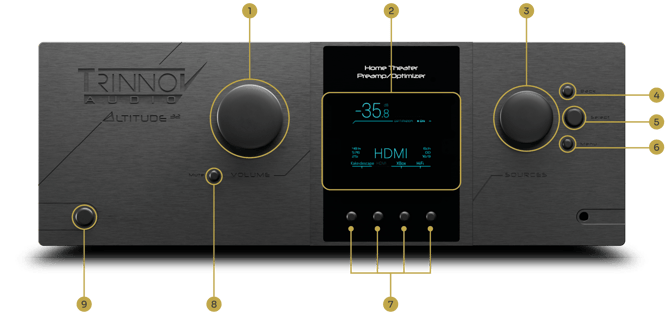
- Volume knob
- Front-panel display
- Selection knob
- Back button
- Select button
- Menu button
- Direct source selection buttons
- Mute button
- Power button
Rear Panel
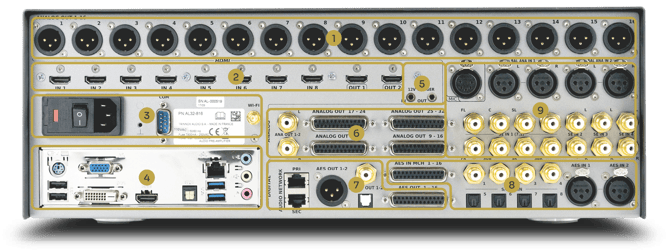
- ANALOG OUTPUTS 1-16 ON XLR CONNECTORS
- HDMI 2.1 - 8 INPUTS, 2 OUTPUTS
- POWER
- AC Input
- Fuse
- Master Power Switch
- RS232
- Serial number
- Wi-Fi Antenna Connector
- PC CONNECTORS
- TRIGGER 12V IN/OUT
- ANALOG OUTPUTS
- 1-32 on 4x DB25 Connectors
- 1x Stereo on RCA
- DIGITAL OUTPUTS
- 1x AES3 (8 or 16 channels) on DB25
- 1x Stereo AES/EBU on XLR
- 1x Stereo S/PDIF on RCA
- 1x Stereo S/PDIF on Toslink
- 2x Network audio ports (unused)
- ANALOG INPUTS
- 1x 3D Microphone Input on 5-pin XLR
- 2x Stereo Inputs on XLR
- 1x 7.1 Input on RCA
- 3x Stereo Inputs on RCA
- DIGITAL INPUTS
- 1x AES3 DCI compliant (8 or 16 channels) on DB25
- 4x S/PDIF on RCA / 1x 7.1 PCM
- 4x S/PDIF on Toslink / 1x 7.1 PCM
- 2x Stereo AES/EBU on XLR
Technical Notes
- The analog output DB25 connectors follow the standard TASCAM analog pinout. This ensures compatibility with most multichannel power amplifiers using the same convention, including the Amplitude16.
- The digital input/output DB25 connectors use the Doremi / DCI AES3 pinout. This layout is similar to the TASCAM analog pinout, but each position carries a pair of AES/EBU digital channels instead of a single analog channel.
- The Altitude32 is not compatible with newer generation Ethercon 3D Measurement microphones but accepts both XLR5 and 4x XLR3 connectors for older generation microphones.
- Analog output 1&2 are mirrored across the analog XLR, analog DB25, AES/EBU XLR and S/PDIF connectors. Don’t use them simultaneously.
AltitudeCI
Front Panel
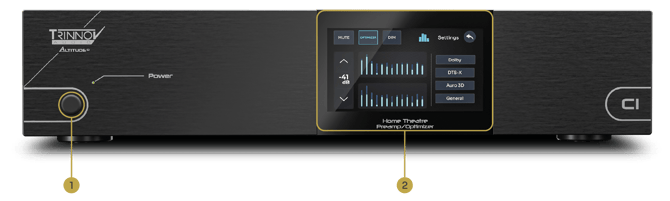
- Power button
- Touchscreen
Rear Panel
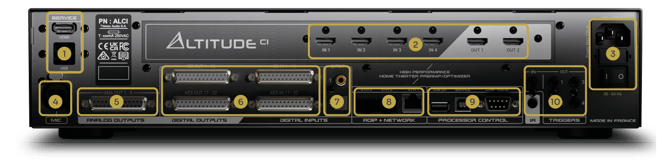
- SERVICE CONNECTORS
- 1x PC HDMI Output
- 2x PC USB Type A
- HDMI 2.1 - 4 INPUTS, 2 OUTPUTS
- POWER
- AC Input
- Fuse
- Master Power Switch
- MICROPHONE - 1x ETHERCON INPUT
- ANALOG OUTS - 1-8 on 1x DB25 CONNECTOR
- AES/EBU INPUT/OUTPUT
- 32x Inputs on 2x DB25 connectors
- 32x Outputs on 2x DB25 connectors
- DIGITAL INPUTS - 2x S/PDIF ON COAXIAL/TOSLINK
- NETWORK
- 1x Gigabit Ethernet on RJ45
- 2x Gigabit Ethernet on SFP
- CONTROL
- 1x Auxiliary Core USB Type A
- 1x Auxiliary Core USB Type B
- 1x RS-232 serial control port
- TRIGGER & IR
- 12V Trigger: 1x In / 3x programmable out
- 1x IR input (jack 3,5”)
Technical Notes
- The analog output DB25 connectors follow the standard TASCAM analog pinout. This ensures compatibility with most multichannel power amplifiers using the same convention, including the Amplitude16.
- The digital input/output DB25 connectors use the Doremi / DCI AES3 pinout. This layout is similar to the TASCAM analog pinout, but each position carries a pair of AES/EBU digital channels instead of a single analog channel.
- Please make sure you know what network mode you are using before connecting your network to either Ethernet port of the AltitudeCI.
- The AltitudeCI is not compatible with older generation 3D Measurement microphone and only accepts the newer Ethercon Microphone.
Amplitude16
Front Panel
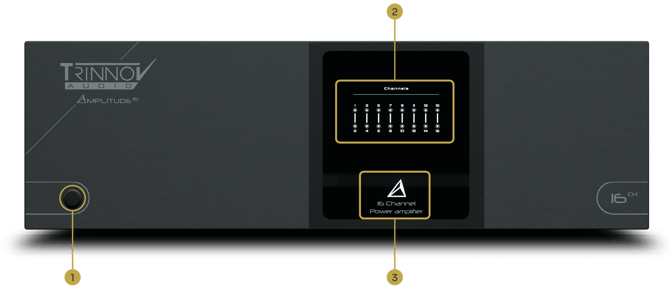
- Power button
- Front panel LEDs
- Power LED
Rear Panel
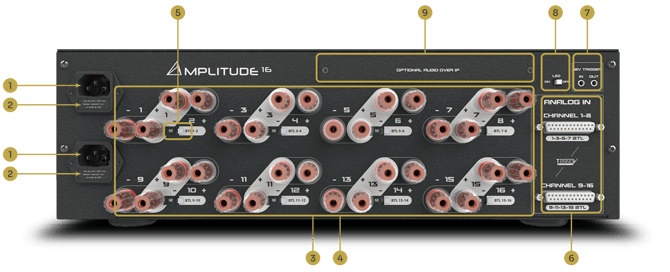
- 2x AC Inlets
- 2x rear panel fuse
- Positive binding post
- Negative binding post
- Bridging switch
- Analog inputs (DB25)
- Remote trigger input & output
- LED switch
- Optional Dante input board
Technical Notes
Front power leds are indicating:
- Normal operation (white), clipping (red), protection (blinking red).
- Bridge status for each pair of channels (vertical LED bar)
- With the optional Dante input board, only channel routed through the audio network to the amplifier will be lit
The Power LED indicates:
- Standby mode (dimmed red)
- Booting (waging green)
- Powered on (full white)
Optional Dante input board: analog inputs are not functioning properly is the Dante board is installed. Please use either.
The analog input DB25 connectors follow the standard TASCAM analog pinout. This ensures compatibility with the Altitude32 and AltitudeCI.
NOVA
Front Panel
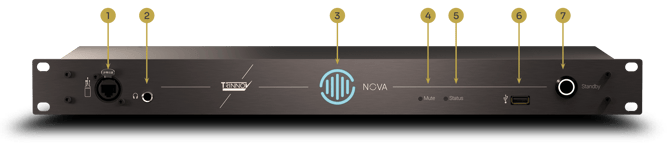
- 3D Microphone input
- Headphone output
- Optimizer status
- Mute LED
- Status LED
- La Remote USB port
- Standby/Mute button
Rear Panel
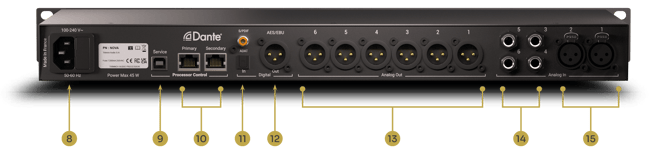
- Power inlet
- Service/Control USB port
- Dante/Control network ports
- ADAT & S/PDIF inputs
- AES/EBU outputs (XLR)
- Balanced analog outputs (XLR)
- Balanced analog inputs (Jack TRS)
- Balanced analog inputs (XLR)
Front Panel Status
Please refer to the user manual for advanced controls and reset.
Standby button
|
Black |
unit is off |
|
Blue |
unit is powered on |
|
Yellow |
unit is turning on or off |
|
Red |
A hardware power failure occurred. |
Status LED
|
Green blinking |
Booting up, or loading a preset configuration |
|
Green |
Ready |
|
Green/Blue blinking |
Audio clock error |
|
Red |
A System error occurred |
|
Blue |
Network reset in progress |
|
Blue blinking |
Software update in progress |
Mute LED
|
Red |
All the speaker outputs of the NOVA unit are muted |
|
Yellow |
The monitoring DIM is engaged, the speaker output is lowered |
Optimizer LED
|
Red blinking |
The optimizer is in bypass mode |
|
Yellow |
The optimizer is NOT calibrated |
|
Blue |
The optimizer is calibrated |
|
Yellow blinking |
The optimizer is computing filters |
Technical Notes
- Please make sure you know what network mode you are using before connecting your network to either Ethernet port of the NOVA
DB25 Pinouts
Our processors and amplifiers use DB25 connectors.
DB25 pinouts can vary and it's important to ensure that you are using the right cables.
Please refer to the dedicated article covering DB25 pinouts for Trinnov products.