![Logo_Trinnov_Black_CMJN.png]](https://kb.trinnov.com/hs-fs/hubfs/ISE%202024/Logo_Trinnov_Black_CMJN.png?height=50&name=Logo_Trinnov_Black_CMJN.png)
Summary:
- What is an active crossover?
- Trinnov-specific capabilities
- Prerequisites before starting the calibration
- Filters available in Expert mode
- Step 1: set the crossover filters
- Step 2: calibrate each speaker individually
What is an active crossover?

An active crossover replaces the passive crossover network inside a multi-way loudspeaker.
Instead of driving the speaker with a single amplifier channel, the incoming signal is split into multiple frequency bands, each feeding a dedicated driver (woofer, midrange, tweeter, etc.) through its own amplifier channel.
This approach provides significantly greater control over:
- Crossover frequencies and slopes
- Time alignment between drivers
- Gain and polarity per driver
- Overall acoustic integration of the loudspeaker
On Altitude, the signal splitting, alignment, and verification are handled by a dedicated Active Crossover Calibration step, designed to simplify what is traditionally a complex and error-prone process.
Trinnov-specific capabilities
Trinnov's semi automatic active crossover calibration system is unique and supports:
- Up to 4-way active speakers
- Semi-automatic calibration driven by real acoustic measurements
- Both Basic and Expert modes
- Time-domain and frequency-domain analysis tools
Prerequisites before starting the calibration
Before starting the active crossover calibration, the following conditions must be met:
- Speakers declared as multi-way in the Routing page
(see the dedicated Routing Configuration article) - Each speaker way:
- Properly connected to the correct amplifier channel or driver
- Verified individually using pink noise
- Manufacturer specifications available, including:
- Recommended crossover frequencies
- Filter types and slopes
Caution: incorrect wiring or driver assignment will result in invalid measurements and misleading alignment results.
Filters available in Expert mode
In Expert mode, the Altitude allows full control over crossover filter types and slopes.
Filter types
Linkwitz-Riley (LR)
The default Trinnov crossover type.
- Flat summed response at the crossover point
- In-phase summation between adjacent ways
- Smooth transition between drivers
The most commonly used configuration is LR4 (4th order, 24 dB/oct), which offers an excellent balance between acoustic separation and summation accuracy.
Bessel
Optimized for time-domain behavior.
- Maximally flat phase response
- Best transient preservation
- Gentler roll-off than other filter types
Because of the gradual transition, the summed amplitude response may not be perfectly flat. Bessel filters are typically chosen when transient accuracy is prioritized over strict frequency-domain summation.
Butterworth
Optimized for magnitude response.
- Maximally flat magnitude per section
- Each section is –3 dB at cutoff
When summed, Butterworth filters can produce a +3 dB peak at the crossover frequency unless compensated. They provide a steeper roll-off than Bessel filters, but less ideal summation than Linkwitz-Riley.
Filter slopes
The filter order determines the attenuation per octave. Higher orders provide steeper separation between drivers but increase sensitivity to alignment errors.
|
Linkwitz-Riley |
Bessel |
Butterworth |
|||
|
Order |
Slope |
Order |
Slope |
Order |
Slope |
|
L-R 2 |
12dB/Oct |
Bsl 2 |
12dB/Oct |
Bwth 1 |
6dB/Oct |
|
L-R 4* |
24dB/Oct |
Bsl 3 |
18dB/Oct |
Bwth 2 |
12dB/Oct |
|
L-R 6 |
36dB/Oct |
Bsl 4 |
24dB/Oct |
Bwth 3 |
18dB/Oct |
|
L-R 8 |
48dB/Oct |
Bwth 4 |
24dB/Oct |
||
|
Bwth 6 |
36dB/Oct |
||||
|
Bwth 8 |
48dB/Oct |
||||
Note: in Basic mode, the Altitude automatically applies Linkwitz-Riley 4th order (LR4) filters.
Step 1 - Set the crossover filters
Basic mode
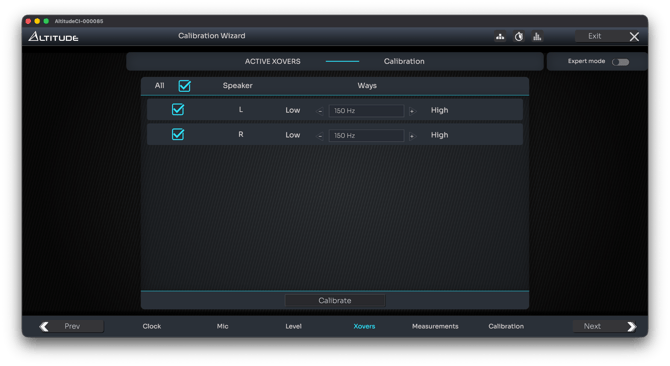
You only need to define the crossover frequency for each speaker.
All other parameters are handled automatically using Trinnov’s default filter model.
Expert mode
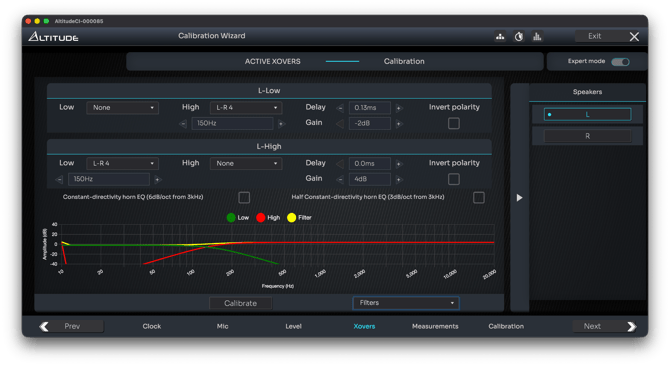
Each speaker way is configured independently:
- High-pass and low-pass filters
- Crossover frequency
- Filter type
- Filter slope
The filter graphs display:
- The theoretical response of each filter
- The reconstructed response, showing how adjacent ways combine in both frequency and phase
These visualizations are essential to understand the real impact of filter choices before measuring the speaker.
Horn EQ options
Two optional compensations are available:
- Constant-directivity horn EQ: +6 dB/oct from 3 kHz
- Half constant-directivity horn EQ: +3 dB/oct from 3 kHz
These are designed to compensate for the natural high-frequency roll-off of horn-loaded speakers, commonly used in commercial cinema environments.
Step 2 – Calibrate each speaker individually

Unlike a full system calibration, active crossover calibration is performed speaker by speaker, and not globally.
Each speaker is measured one way at a time, using a test signal that is already filtered according to the crossover settings defined in the previous step.
- A filtered test signal is sent to each speaker way in sequence
- Measurements are performed independently for each driver
- The goal is to acoustically align all ways so they behave as a single coherent loudspeaker
Basic mode
In Basic mode, the process is fully automatic.
Once the measurement is complete, you can proceed to the next step unless an error message is reported.
No manual adjustment is required at this stage.
Expert mode
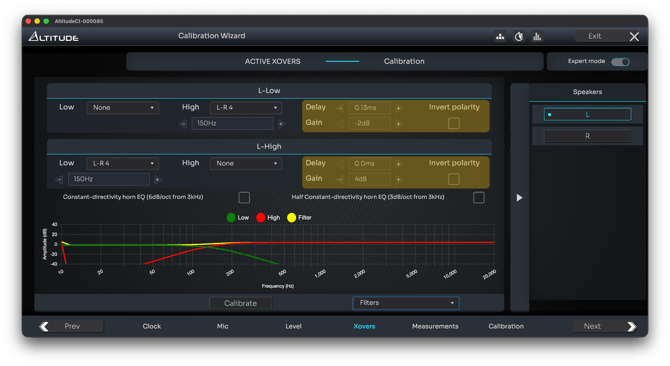
In Expert mode, the Optimizer computes and exposes the parameters required for precise driver alignment:
- Delay
- Gain
- Polarity
These values are calculated automatically but remain editable, allowing expert users to refine the alignment when needed.
In addition to the crossover filter graphs, three diagnostic representations are available to validate and fine-tune the result.
Impulse response alignment
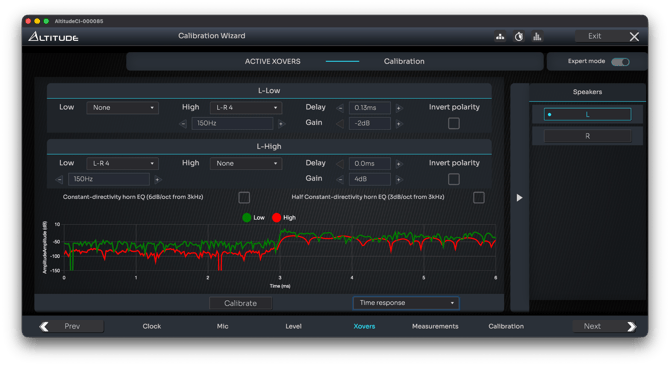
The Impulse Response graph displays the measured impulse of each individual driver after the calculated delay, gain, and polarity have been applied.
This graph allows you to:
- Verify that all speaker ways are time-aligned at the listening position
- Confirm correct polarity between adjacent drivers
- Identify misalignment between acoustic centers of the drivers
Tip: any manual adjustment to delay or polarity is reflected in real time in the impulse response display, making it possible to fine-tune alignment with immediate visual feedback.
Correct impulse alignment is a prerequisite for meaningful crossover integration.
Power and direct response representation
This representation illustrates one of Trinnov’s most distinctive calibration principles: combining time-domain and frequency-domain analysis to achieve faster and more reliable results.
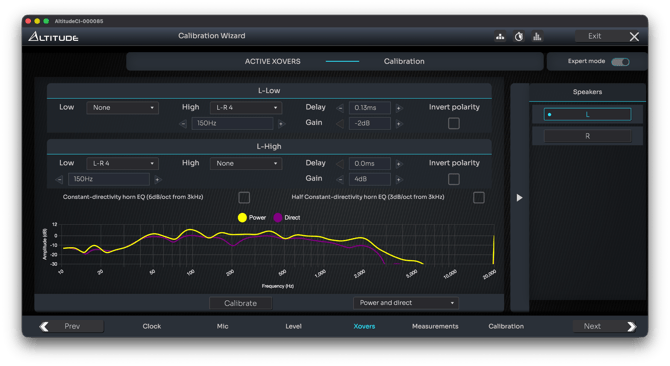
The graph overlays two traces:
- Power response
The reconstructed response of the full loudspeaker, combining all ways as measured with the calculated delay, gain, and polarity. This representation includes room interaction and off-axis energy. - Direct response
The impulse response filtered in the time domain to exclude late reflections, isolating the direct sound arriving at the measurement position.
At the crossover region, both responses should be as close as possible.
A close match indicates that acoustic energy is correctly radiated toward the listening position, while a gap between the two typically reveals driver misalignment, causing energy to be radiated in unintended directions.
Important: the objective here is not to achieve a flat frequency response. Frequency flattening is handled later by the Optimizer during full system calibration.
Tip: If needed, you can further refine delay, gain, or polarity to reduce discrepancies between the power and direct responses, while ensuring that impulse responses remain properly aligned.
Both representations must be interpreted together to achieve optimal crossover integration.
Next step in the calibration workflow
Once the active crossover calibration is complete, you can proceed to the final decision in the calibration workflow: perform a single-point or multi-point full system measurement for the Optimizer
Refer to the Single or Multiple Measurements article to choose the approach best suited to your room and listening area.