![Logo_Trinnov_Black_CMJN.png]](https://kb.trinnov.com/hs-fs/hubfs/ISE%202024/Logo_Trinnov_Black_CMJN.png?height=50&name=Logo_Trinnov_Black_CMJN.png)
Summary:
Overview
The About page gathers key information about your unit, Trinnov Audio, and where to find support.
This page is especially useful when contacting your dealer or Trinnov Support, as it displays the unit’s serial number, software version, and license details at a glance.
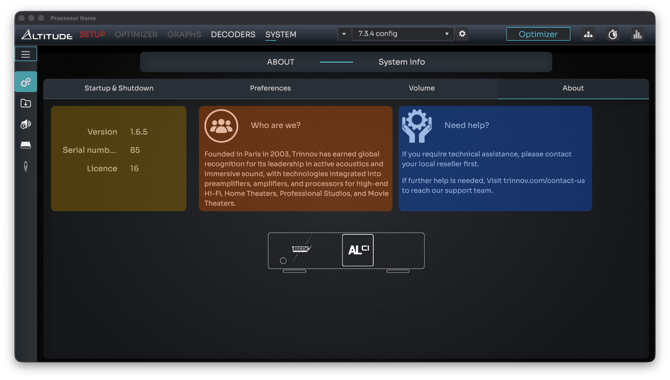
The page includes three sections:
- Left: Unit information
- Middle: About Trinnov
- Right: Support information
Accessing the About Page
- Open the Trinnov App or connect to the Web UI in your browser.
- Click System in the top navigation bar.
- In the General section, open the About tab.
Unit Information
This section shows all the essential details related to your processor:
- Version - The software version currently installed.
- Serial Number - Unique identifier of your unit.
- License - Number of audio channels activated on your processor.
Channel upgrades:
- NOVA and AltitudeCI: additional channels can be added through a software license.
- Altitude32: channel count can be increased through a hardware upgrade.
Note: the Altitude16 does not support channel-count upgrades.
About Trinnov
This section provides a short introduction to Trinnov:
“Founded in Paris in 2003, Trinnov develops advanced audio technologies used in high-end Hi-Fi systems, home theaters, professional studios, and cinemas around the world.”
It highlights the company’s background and expertise.
Support Information
Here you’ll find guidance on where to get help:
“If you need assistance, please contact your local reseller first. If further support is required, visit trinnov.com/contact-us.”
This ensures you’re directed to the most efficient support channel for your region and product.