![Logo_Trinnov_Black_CMJN.png]](https://kb.trinnov.com/hs-fs/hubfs/ISE%202024/Logo_Trinnov_Black_CMJN.png?height=50&name=Logo_Trinnov_Black_CMJN.png)
Summary
Licensing and Upgrading
-
What is an Optimizer license?
By default, NOVA comes with 2 Optimization licenses, which means you can calibrate up to 2 speakers.
However, NOVA can be upgraded with extra pairs of licenses to calibrate up to 6 speakers (or subwoofers).
If you wish to use the Immersive feature, you can unlock it by adding 2 additional licenses after 6 channels.
Note: The immersive feature is only available for Dante outputs.
-
What is a speaker set?
A speaker set is a group of speakers (and subwoofers) used as a monitoring system in your studio.
NOVA can be configured to handle multiple speaker sets as long as the total number of channels required by the different speaker sets does not exceed 6 channels for Analog/AES and 12 channels for Dante.
Beyond those channel counts, you can however declare non-optimized speaker sets to benefit from the remaining available physical outputs of NOVA.
Note that speakers and subwoofers can be shared across different speaker sets.
As an example, you could have 4 monitors (Stereo 1 & 2 connected to the outputs 1 to 4) and 2 subwoofers (connected to the outputs 5 & 6) declared as 3 different speaker sets:
- Speaker Set A (Stereo 1 – outputs 1 & 2)
- Speaker Set B (Stereo 1 + 2 subs – outputs 1,2, 5, 6)
- Speaker Set C (Stereo 2 + 2x subs – output 3 to 6)
In this example, we see that the two subwoofers are shared between the different speaker sets.
-
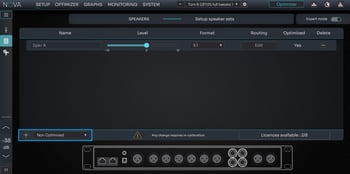
What is a non-Optimized speaker set?
A non-Optimized speaker set is a speaker set declared during the configuration of NOVA that will not only be aligned in level and delays with the other speaker sets to ensure seamless switching between each speaker set.
On the other end, Optimized speakers fully benefit from the exclusive Optimizer technology, including frequency and phase corrections.
-
What is a Direct-Out?
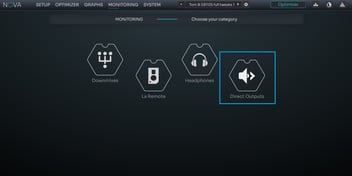
A direct-out is an output not affected by volume control and delay, directly fed from an input without any processing nor gain.
Direct-out are typically set-up to feed external master bus processors or metering devices.
Integration and Compatibility
-
How can NOVA be integrated with existing audio setups?
To understand all the options you have in terms of integration with NOVA, we made a series of 3 articles covering the possibilities
We invite you to go through these as they should cover many questions you might have. If you need further help, please reach out to support@trinnov.com.
-
What are the input/output available on NOVA?
NOVA is a versatile monitor controller. It offers 24x different physical input channels and 16 different physical output channels.
32x physical inputs;
-6x Analog (2x XLR + 4x Jack TRS)
-2x S/PDIF (Coaxial)
-8x ADAT (Optical at 48kHz)
-16x Dante
24x physical outputs:
-6x Analog (XLR)-2x AES3 (XLR)
-16x Dante
-
How can I control NOVA as a monitor controller?
NOVA is best controlled with Trinnov’s La Remote hardware controller, which offers the best level of integration and customization.
Alternatively, NOVA can be controlled via an iPad or directly from your DAW using the Trinnov app.
Last but ot least, NOVA is compatible with EUCON, which means you can control NOVA directly from your Avid control surface, provided it supports EUCON.
At the time of writing, this makes NOVA compatible with the following devices:
-Avid Control
-Avid Dock
-Avid S1
-Avid S3
-Avid S4
-Avid S6
-
Can I use NOVA as an audio interface?
Yes, NOVA can be used as an audio interface and be the only device between your DAW and your monitors in a music environment. That requires you to install Dante Virtual Soundcard on your DAW.
This is particularly relevant for mixing or producing electronic music but if you need microphone preamps or a full recording rig, NOVA is not appropriate.
One could also consider NOVA as a perfect audio “end-point”, feeding studio monitors in every room (soundroom, edit suite…) of a large broadcast or post facility powered by Dante, AES67 or Ravenna.
-
Can I use NOVA with another audio interface?
NOVA is equipped with S/PDIF, ADAT, Analog and Dante inputs as well as AES/EBU and Dante outputs.
The integration with another audio interface will mostly depend on connectivity.
Integration can be either achieved via a monitoring loop if it is available in your interface or more traditionally by inserting NOVA after your interface and using NOVA’s DAC to feed your monitors.
-
Can I keep my DAC with NOVA?
NOVA features really good sounding DAC and we invite you to listen to them before making a decision that could overcomplicate your system for no good reason.
This being said, it is really easy to keep your DAC in the chain with NOVA, as long as your DAC is equipped with an AES/EBU or a Dante input.
With AES/EBU, you will only be able to use an external DAC for 2 channels whereas a Dante input on a DAC would allow you to use an external DAC for up to 6 output channels from NOVA.
You could also use the analog output of NOVA to feed your DAC but this would defeat the purpose of staying fully digital.
-
Is the headphone output independent from other outputs?
Yes, the headphone output uses a dedicated circuit with specific DAC and headphone amp.
-
Can I use more outputs than speakers?
NOVA offers 24 different physical outputs but can only handle 6 optimized speakers or subwoofers simultaneously.
However, beyond the 6 optimization channels available, physical outputs can be used to declare non-optimized speakers or direct outputs.
Note: You can go up to 12 channels with Dante using the Immersive feature.
Features and Functionality
-
Does NOVA support Atmos?
Yes, The Nova supports Atmos but only through Dante.
NOVA is limited to 6 simultaneous optimized speaker outputs for Analog/AES and 12 simultaneous optimized speaker outputs for Dante.
It is therefore limited to 5.1 for Analog/AES and 12.0 / 11.1 / 9.1.2 / 7.1.4 for Dante.
-
What is the maximum number of speakers NOVA can calibrate?
Despite its 24 different physical output channels, NOVA supports only up to 6 optimized output channels.
You can freely set each of these 6 optimized output channels as a speaker or as a subwoofer output.
-
What speaker configurations are supported by NOVA?
NOVA supports up to 6 simultaneous optimized speaker outputs.
Each of these optimized output channels can be used for a monitor or for a subwoofer.
Consequently, the following speaker configurations are supported by NOVA:
- NOVA 2
- Mono
- Mono + Sub
- Stereo
- NOVA 4
- Stereo + Sub
- Stereo + 2x Subs
- 2x Stereo
- Quad
- NOVA 6
- 3x Stereo
- 2x (Stereo + Sub)
- 1x Stereo + sub + 1x stereo
- 1x 5.1
- NOVA 12
- 6.0
- 7.0
- 7.1
- 8.0
- 5.1.4 (ex. C)
- 5.1.2
- 5.1.4
- 5.1.6
- 7.1.4 (ex. C)
- 7.1.2
- 7.1.4
- 9.1.2
- 11.1 Auro
- 12.0
-
Does NOVA support subwoofers?
Yes, any of the (up to) 6 optimized output channels of NOVA can be used to calibrate a subwoofer.
NOVA supports single or dual subwoofers that are commonly used for stereo applications.
Any subwoofer can be declared and calibrated only once, but shared across multiple speaker sets.
NOVA offers a wide range of bass management settings (crossover frequency, filter type, filter slope...) for the most advanced users.
-
Does NOVA include calibration headphones?
No, the dedicated headphone output of NOVA is not processed.
You have control over the headphone level and feed from either La Remote or NOVA’s interface.
-
What is NOVA’s latency?
The processing Latency of the Optimizer depends on certain parameters such as the sampling rate (like on a DAW) but you can consider that it will be around 20ms on average for 48kHz playback.
You can use the hardware bypass feature to get 0ms of latency.