![Logo_Trinnov_Black_CMJN.png]](https://kb.trinnov.com/hs-fs/hubfs/ISE%202024/Logo_Trinnov_Black_CMJN.png?height=50&name=Logo_Trinnov_Black_CMJN.png)
Summary
- Introduction
- How to Access Network Modes
- Key Concepts Before Choosing a Mode
- AltitudeCI Network Modes
Introduction
Some Trinnov processors support multiple network modes that change how their Ethernet ports behave. These modes control how the processor connects to your control network, handles Dante/AES67 traffic, and manages isolation or redundancy.
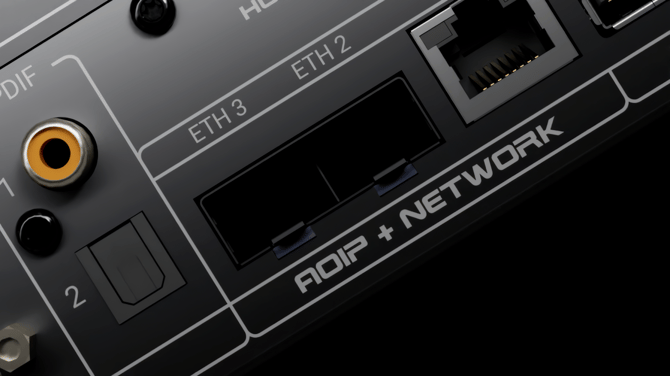
The following products support multiple network modes:
- AltitudeCI - three Ethernet interfaces, with several isolation and bridging options
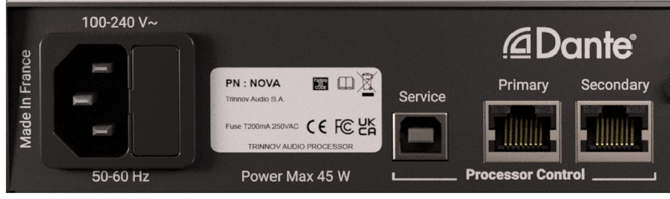
- NOVA - two Ethernet ports with three selectable modes
Understanding and selecting the right network mode is essential for:
- Ensuring reliable communication with the Trinnov App
- Maintaining stable Audio over IP performance
- Avoiding network loops
- Designing clean and robust network topologies
How to Access Network Settings
You can adjust network settings through the front panel touchscreen (AltitudeCI only) or through the User Interface (Trinnov App / Web UI) on both products.
This article describes and explains network modes, not how to change them.
Please refer to the Modify network settings article to learn how to switch from a network mode to another.
Key Concepts Before Choosing a Mode
Tip: before selecting a mode, it is helpful to understand the functional difference between traffic types.
Control Network
Used for:
- Trinnov App
- Web UI
- Firmware updates
- License activation
- IP/Automation control
AoIP Network
Used for:
- Dante (Primary/Secondary)
- AES67 audio transport
- PTP clocking and synchronization
Isolation, Redundancy & Bridging
- Isolation:
Each port operates on a different IP interface and cannot pass traffic between networks. - Redundancy:
Two ports carry separate Dante networks (Primary and Secondary). Both run in parallel for seamless audio failover on physically isolated paths. - Bridging (Switch Mode):
Ports act like a built-in Ethernet switch, sharing one network/subnet.
AltitudeCI Network Modes
AltitudeCI offers three network modes.
Switch Mode
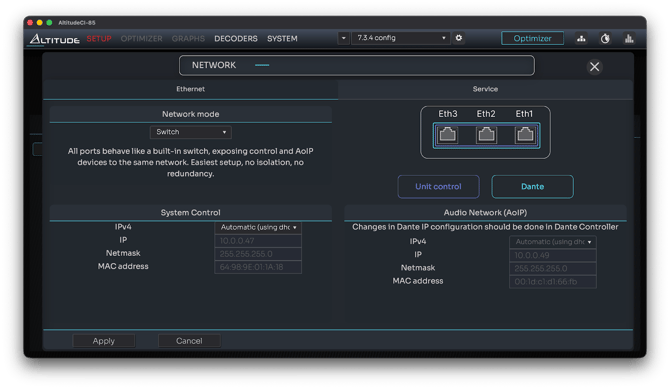
Description
In Switch Mode, all Ethernet ports on the AltitudeCI act as part of an integrated two/three-port switch at the physical level.
However, the processor still exposes two distinct IP interfaces internally, one for Control and one for AoIP, each with its own IP address.
Both interfaces coexist on the same physical LAN and subnet, with no isolation or redundancy applied.
Port Behavior
- All ports are bridged at Layer-2, acting like a small unmanaged switch
- The processor exposes two IP addresses:
- One for the Control interface
- One for the AoIP interface (Dante/AES67)
- Control and AoIP traffic share the same physical network path
- No Primary/Secondary separation
Intended Use
- Simple environments where control and AoIP operate on the same LAN
- First-time setup or troubleshooting
- Installations with a single network drop and no need for isolation
Benefits
- Fastest and easiest configuration
- Does not require external switching
- Allows direct connection of a laptop or control system
Notes:
- No isolation between Control and AoIP
- No Dante redundancy
- Connecting multiple CI ports into the same switch can create network loops
- Large AoIP networks may experience jitter or congestion in this mode
Isolated 2 & 3 Mode (default)
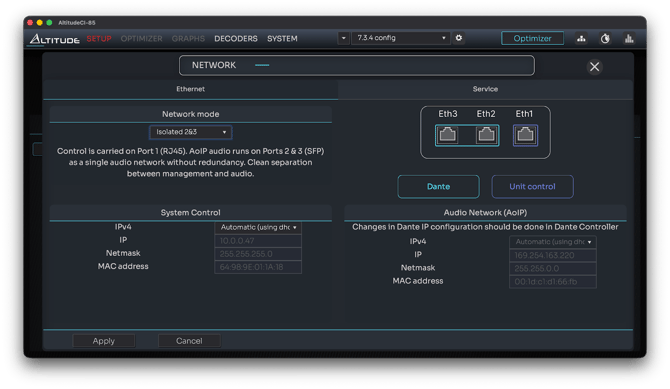
Description
Control uses Port 1 (RJ45), while AoIP runs on Ports 2 & 3 (SFP) as a single audio network, without redundancy.
Port Behavior
- Eth1 (RJ45): Control
- Eth2 & Eth3 (SFP): AoIP
- Unified AoIP network (no Primary/Secondary)
Intended Use
- DirectLink Approach: direct connection between AltitudeCI and Amplitude16 over Dante.
- Projects requiring full control-AoIP separation
- Installations preferring RJ45 for control
Benefits
- Clean separation
- Flexible fiber-based AoIP connectivity
Notes:
- No Dante redundancy
- Entire AoIP network relies on SFP infrastructure
- The AltitudeCI is provided with an SFP RJ45 module
Fully Isolated Mode
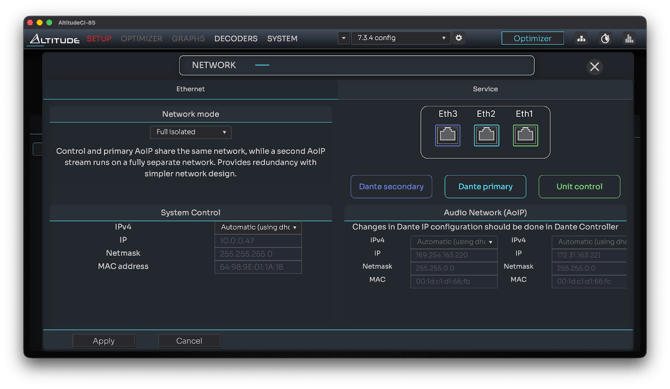
Description
Fully Isolated mode is the most segregated and secure configuration on AltitudeCI.
Each of the three Ethernet ports operates on a completely independent network interface, with no shared IP stack, no bridging, and no traffic overlap.
- Port 1 handles Control exclusively
- Port 2 carries Dante/AoIP Primary
- Port 3 carries Dante/AoIP Secondary
Port Behavior
- Eth1 (RJ45):
- Dedicated Control interface
- Used by the Trinnov App, Web UI, IP control, firmware updates
- Fully isolated from audio networks
- Eth2 (SFP):
- Dante/AoIP Primary network
- Main audio transport
- Must connect to a dedicated Dante Primary network
- Eth3 (SFP):
- Dante/AoIP Secondary network
- Runs in parallel to Primary
- Must be connected to an independent, physically separate Dante Secondary network
None of these ports share an IP stack, subnet, or switching layer.
Intended Use
- Installations requiring maximum network isolation
- Dante systems requiring full Primary/Secondary redundancy
- High-security environments where the control plane must be strictly independent
- Systems where AoIP stability must be protected from any management or IP-control traffic
Benefits
- Strongest possible isolation between Control, Primary, and Secondary
- Fully compliant Dante Primary/Secondary redundancy
- Eliminates risk of jitter, congestion, or clock disruption from management traffic
- Ideal for complex AV networks with strict IT governance
- Cleanest architecture for large-scale professional systems
Notes:
- The Dante Primary and Dante Secondary networks must not share switches, VLANs, or cabling.
- Control traffic exists only on Port 1 - Dante Primary and Secondary cannot carry UI/control.
- Requires three separate subnets and usually three separate switching paths.
- Recommended for high-end cinemas, studios, performance venues, and all mission-critical installations.
NOVA Network Modes
NOVA provides three modes across its two Ethernet ports.
Switched Mode (default)
Description
In Switched Mode, the two Ethernet ports function as a small two-port switch at the physical layer, allowing devices connected to either port to communicate through a shared link.
However, NOVA still exposes two distinct IP interfaces, one for Control and one for AoIP, each with its own IP address.
Traffic flows freely between ports, but the processor maintains separate logical interfaces internally.
Intended Use
- Simple home networks
- Situations with only one available network drop
- Quick and easy UI discovery
Notes:
- Avoid plugging both ports into the same switch → risk of network loops
- Not suitable for AoIP isolation
Redundant Mode
Description
Redundant Mode on NOVA implements Audinate’s Dante Primary/Secondary redundancy model.
Each Ethernet port becomes a fully independent network interface, operating in a different subnet and carrying its own Dante audio transport.
The unit sends identical Dante audio streams simultaneously over both networks.
- Port 1 carries Control + Dante Primary
- Port 2 carries Dante Secondary
- The two networks must be fully isolated, no shared switches, VLANs, or routing
If the Primary audio network fails (switch outage, cable removal, or link loss), audio continues instantly and transparently through the Secondary path, without audible interruption.
This mode is not IP failover, NIC teaming, or link aggregation, redundancy happens inside the Dante audio transport layer.
Port Behavior
- Port 1 (Ethernet):
- Control network (Trinnov App, UI, firmware updates, IP control)
- Dante Primary audio network
- Isolated from Port 2
- Port 2 (Ethernet):
- Dante Secondary audio network only
- No control traffic
- Independent interface with its own subnet
- Both audio interfaces run in parallel
- Primary and Secondary networks must not overlap or feed into the same switching infrastructure
Intended Use
- Professional Dante installations requiring uninterrupted audio, even if a port, cable, or switch fails
- Systems deployed on two independent network infrastructures (IT-grade or AV-grade)
- High-reliability setups such as cinemas, studios, and performance environments
Notes:
- Primary and Secondary Dante networks must be fully isolated, no bridging, no shared switches, and no VLAN overlap unless explicitly engineered
- Only the Primary port carries control traffic
- Incorrect merging of Primary and Secondary networks will break Dante redundancy
- This mode does not provide redundancy for control traffic, only for Dante audio transport
Isolated Mode
Description
One Ethernet port is dedicated to system control.
The other is reserved exclusively for Audio over IP traffic.
Intended Use
- Dante/AES67 installations
- Systems needing clean separation between control and audio
- Installations where AoIP requires its own dedicated network
Notes
- Only the control port can receive internet access
- Prevents control traffic from affecting AoIP clocking
Choosing the Right Mode (Quick Guide)
|
Requirement |
Recommended Mode |
|
Easiest and fastest setup |
Switch (CI) / Switched (NOVA) |
|
Dante Primary + Secondary redundancy |
Fully Isolated (CI) / Redundant (NOVA) |
|
Strict control vs AoIP separation |
Isolated 2&3 (CI) or Isolated (NOVA) |
|
Prefer using SFP fiber for AoIP |
Isolated 2&3 (CI) |
Best Practices & Common Pitfalls
- Avoid creating network loops in switch/bridged modes.
- Always plan your AoIP clocking and multicast traffic.
- Keep DHCP enabled unless static assignments are strictly required.
- After changing modes, give the processor time to re-establish connectivity.
- Ensure the Trinnov App connects to the Control network, not the AoIP interface.