![Logo_Trinnov_Black_CMJN.png]](https://kb.trinnov.com/hs-fs/hubfs/ISE%202024/Logo_Trinnov_Black_CMJN.png?height=50&name=Logo_Trinnov_Black_CMJN.png)
Software licenses unlock additional processing channels on the most recent Trinnov processors (released in 2023 or later). When you purchase additional licenses through your authorized dealer, they are automatically linked to your processor and can be installed seamlessly through the Trinnov app.
Summary:
- What are Trinnov licenses
- How the licensing system works
- Purchasing additional licenses
- Frequently Asked Questions
What are Trinnov licenses
Trinnov licenses are digital entitlements that activate processing channels on your Trinnov processor.
Note: Trinnov’s software licensing system is only compatible with processors launched after 2023.
Each license unlocks specific capabilities:
Channel licenses enable additional speaker outputs, allowing you to expand your system from the base configuration to larger immersive audio layouts.
Base configurations:
- The processor ships with a standard number of active channels
- Additional channels are available through license upgrades
- Licenses are tied to your specific processor's serial number
Key characteristics:
- Licenses are permanent and never expire
- They remain with the processor, even if ownership changes
- Licenses cannot be transferred between processors
- Installation is done through the Trinnov app
Note: Licenses are processor-specific and cannot be moved or shared between multiple units. Each processor requires its own license purchases.
How the licensing system works
The Trinnov licensing system is designed for simplicity and security:
Purchase and registration
- Purchase from authorized dealer - Contact your Trinnov dealer to purchase additional channel licenses
- Dealer registers the license - Your dealer submits the license order, linking the license to your processor's serial number
- Automatic activation - Trinnov's system registers the license and makes it available for download
Notification & Activation via the Trinnov App
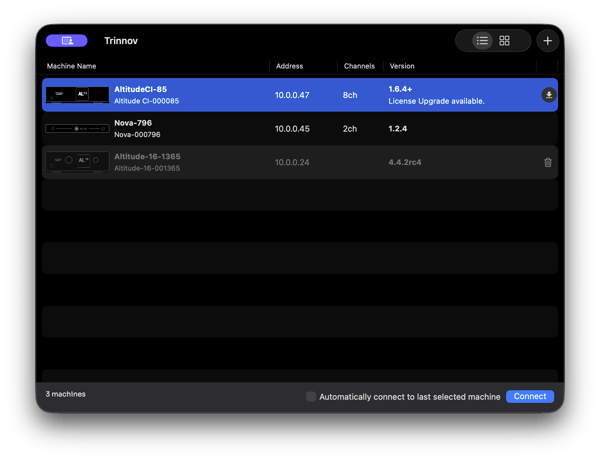
New licence notification on the Trinnov App (macOS)
Once your license is registered:
- App detects new license - When you connect to your processor via the Trinnov desktop app, the app automatically checks for available licenses
- Notification appears - A warning icon or pop-up message notifies you that a license upgrade is available
- One-click installation - Simply click "Upgrade" to install the new licenses
- Automatic reboot - The processor restarts and the new channels become active
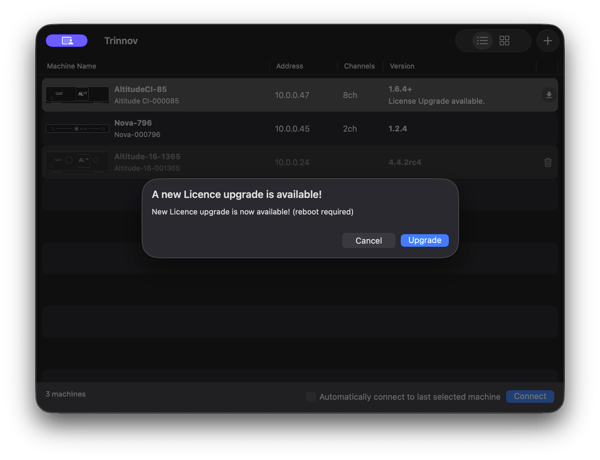
Licence upgrade pop-up window
Important: License installation requires an internet connection on both the computer running the Trinnov app and the processor itself. Ensure both devices have network access before beginning installation.
Caution: if the processor does not reboot by itself, reboot it manually to ensure your licenses are active and can be used.
Cloud-based licensing
Trinnov uses a cloud-based licensing system:
- Licenses are stored securely on Trinnov's servers
- Your processor authenticates with the server during installation
- No physical license files need to be manually transferred
- The system ensures licenses cannot be duplicated or misused
Purchasing additional licenses
Step 1: Determine your needs
Before purchasing:
- Assess your current layout - Count your installed speakers and subwoofers
- Plan future expansion - Consider any upcoming system upgrades
- Check current license count - Navigate to System → General → About in your processor to see active licenses
- Calculate required channels - Determine how many additional licenses you need
Step 2: Contact your authorized dealer
License purchases must be made through authorized Trinnov dealers:
- Locate your dealer - Contact the dealer who sold your processor, or find an authorized dealer on Trinnov's website
- Provide serial number - Give your dealer your processor's serial number (found in System → General → About)
- Specify license count - Tell your dealer how many additional channels you need
- Complete purchase - Process payment through your dealer
Note: Trinnov never sells directly to end-users
Step 3: Wait for registration
After purchase:
- Dealer submits order - Your dealer registers the license purchase with Trinnov
- Trinnov processes request - License registration typically completes within 24-48 hours
- System updates - Your processor becomes eligible for the license upgrade
- Notification appears - The Trinnov app will detect the new license on next connection
Note: Processing time may vary depending on dealer submission timing and Trinnov's processing queue. Most licenses are available within 1-2 business days.
Exception: If your NOVA is already equipped with 6 channels of Optimization, purchasing just 2 additional channels (bringing your total to 8) will automatically unlock a total of 12 channels.
Frequently asked questions
Please refer to Trinnov Licenses - Frequently Asked Questions.